PROFESSIONAL MULTI-INTERFACE VIDEO OUTPUT
Internal Video Output Card
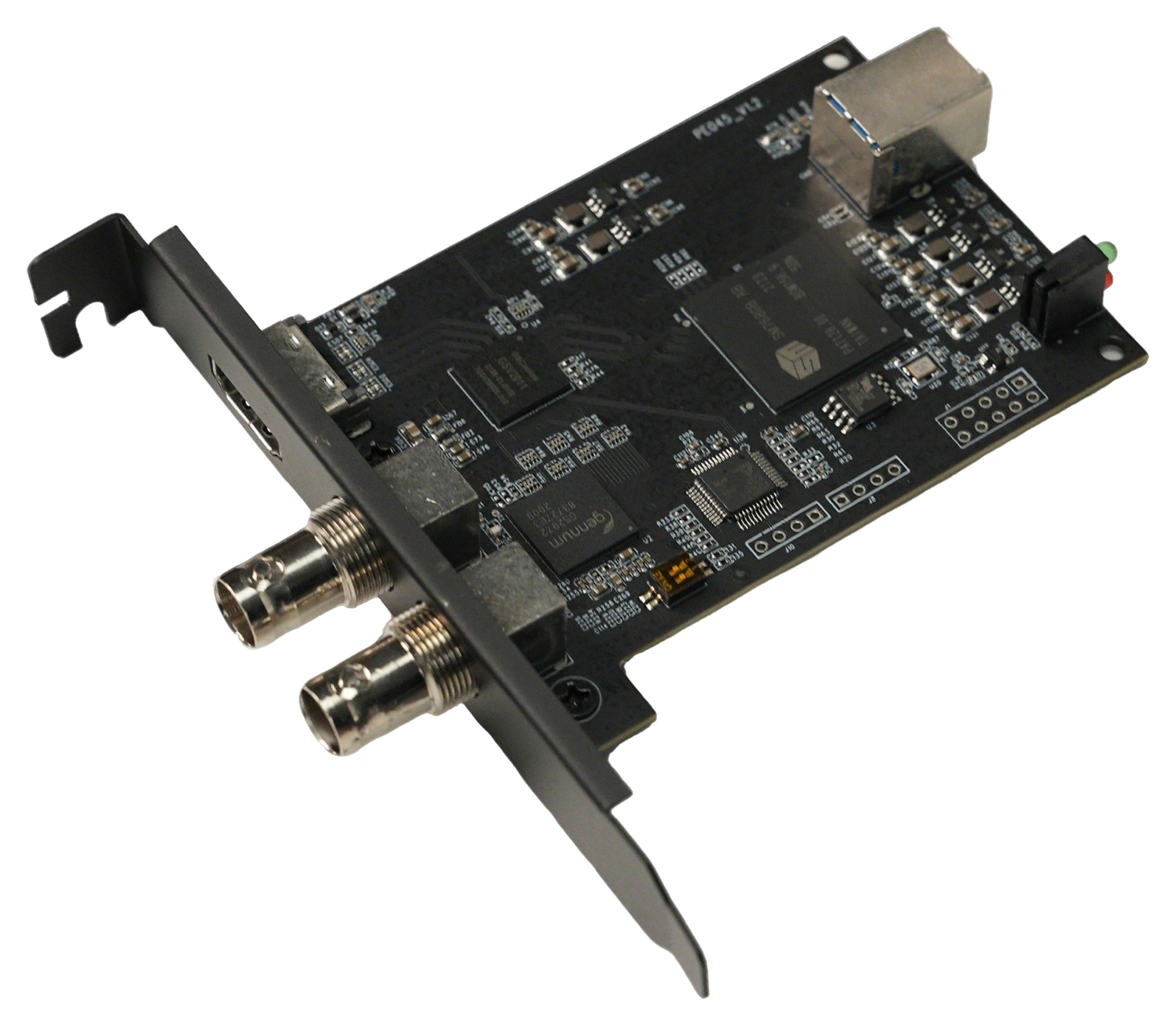
An internal solution for professional video playback, monitoring, and multi-display output. The card connects to the host through USB 3.0 and provides one HDMI 1.4 output plus two 3G-SDI outputs. It supports up to 1920×1080 at 60 Hz with backward-compatible formats and can drive all three video interfaces simultaneously for production systems, workstations, and integrated equipment.
USB 3.0 Host Interface1 × HDMI 1.42 × 3G-SDI1080p60 OutputThree Simultaneous OutputsInternal Form Factor
KEY BENEFITS
Compact and Flexible Multi-Interface Output
Three Simultaneous OutputsOne HDMI output and two SDI outputs can operate simultaneously for multi-monitor, multi-terminal, and mixed-interface display systems.
HDMI 1.4 + 3G-SDICombines a widely used HDMI interface with professional SDI connectivity for standard displays and broadcast monitoring equipment.
Up to 1080p60Supports video output up to 1920×1080 at 60 Hz, with backward compatibility for commonly used resolutions and refresh rates.
USB 3.0 Host ConnectionConnects to the host through USB 3.0 for video data transport and external display expansion.
Internal InstallationAn expansion-card form factor and standard bracket layout support integration into workstations, industrial PCs, and custom systems.
Multi-Platform DriversSupports Windows, macOS, and Android. The matching driver and output component must be installed before use.
USB 3.0 MULTI-INTERFACE VIDEO OUTPUT
Internal Video Output Card
USB 3.0 HDMI + Dual 3G-SDI Internal Video Output Card
The card receives host video data through USB 3.0 and converts it to HDMI 1.4 and dual 3G-SDI outputs. In addition to operating as an extended or duplicated display, it can work with compatible production, playback, and industry applications for external video output. Simultaneous operation of all three interfaces simplifies multi-terminal connectivity and professional system deployment.
1 × HDMI 1.4 video output
2 × 3G-SDI BNC video outputs
Up to 1920 × 1080 at 60 Hz with backward compatibility
Simultaneous HDMI and dual-SDI output
OUTPUT WORKFLOW
From Host Software to HDMI / SDI Displays
01 · INSTALLInstall the Output CardInstall the card inside the host system and connect its USB 3.0 host interface according to the system design.
02 · DRIVERInstall Drivers and ComponentsInstall the driver and external-output component that match the operating system and application.
03 · CONFIGURESelect the Output ModeConfigure extended display, duplicated display, or compatible application-based external output.
04 · OUTPUTConnect the DisplaysConnect the HDMI and SDI interfaces to displays, professional monitors, or other compatible receiving equipment.
OPERATING MODES
Designed for Different Software and Display Workflows
Extended / Duplicated DisplayAfter driver installation, the system can detect an additional display output. Configure desktop extension, duplication, resolution, and scaling as required.
Application External OutputCompatible production or playback software can select the card as an external-output device and send program video directly to HDMI / SDI displays.
Three Connected InterfacesHDMI and two SDI interfaces can connect to different receiving devices at the same time for multi-monitor and mixed-interface systems.
KEY SPECIFICATIONS
Product Specifications
| Product Type | Internal USB 3.0 video output card |
| Host Interface | USB 3.0 |
| Video Outputs | 1 × HDMI 1.4, 2 × 3G-SDI (BNC) |
| Maximum Output | 1920 × 1080 at 60 Hz, backward compatible |
| Simultaneous Output | HDMI and dual-SDI output supported simultaneously |
| Operating Systems | Windows, macOS, Android |
| Driver Requirement | Matching driver and output component required |
| Installation | Internal expansion-card form factor |
APPLICATIONS
Typical Applications
Professional Video MonitoringLive Production & RecordingStudio OutputMulti-Screen PresentationConference & EducationDigital SignageApplication External OutputOEM / ODM Integration
Specification note:Available resolutions, refresh rates, three-output routing, extended/duplicated display modes, and application compatibility depend on the operating system, driver version, output component, host configuration, and receiving equipment. Some external-output workflows may require display scaling to be set to 100%. Refer to the official datasheet, compatibility list, and final confirmation documents.